
Tidy typing.
In every app.
TidyType fixes typos as you type, everywhere on your Mac: Chrome, Slack, Word, Mail, the lot. It uses Apple’s own spell checker and runs quietly in your menu bar.
£9.99 one-off · Free trial from January
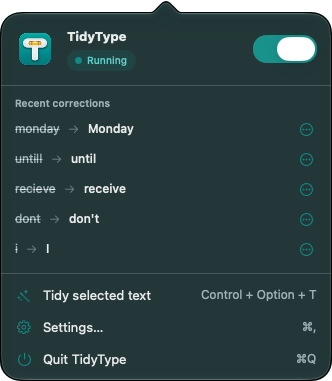
Works where Apple’s autocorrect doesn’t.
macOS autocorrect skips Chrome, Slack, Word and plenty more. TidyType doesn’t, so you get one set of corrections in every app.
Two capitals? Not any more.
Hold Shift a beat too long and you get “THis”. TidyType spots it the moment you finish the word.
The small stuff, sorted.
Missing apostrophes, a lower-case “i”, names, days and places, a sentence that forgot its capital. TidyType fixes them before you notice.
Tidy a whole sentence at once.
Select some text and press Control + Option + T. TidyType adds the capitals and the full stop or question mark, and fixes any spelling it missed.
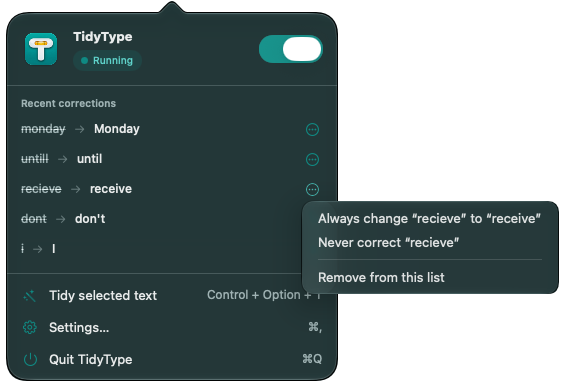
You have the final say.
Your last five corrections sit in the menu bar panel. For each one you can tell TidyType to always make that change, never make it, or just forget it.
Knows when to keep out.
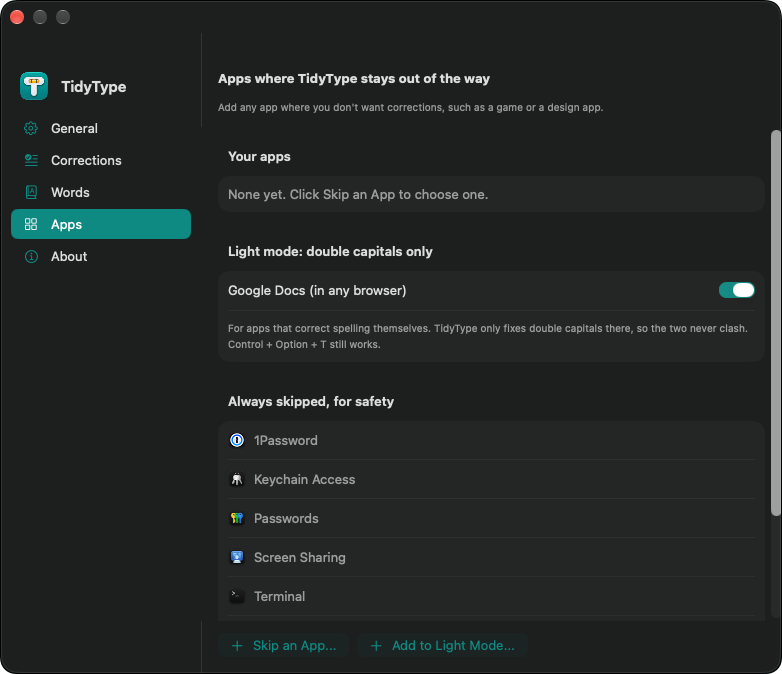
Password fields, Terminal and code editors are always left alone. You can add any app of your own to the skip list.
Your words stay on your Mac.
TidyType does everything on your Mac. What you type is never sent anywhere, never stored and never seen by anyone, including me. There’s no account, no tracking and no cloud.
macOS will ask you to allow two permissions, Accessibility and Input Monitoring. They let TidyType see a typo and fix it, and nothing more. Read the privacy policy
One price. Yours to keep.
one-off payment, VAT included
- 14-day free trial with every feature
- One licence per Mac, and you can move it to a new one
- Free updates throughout version 1
- 14-day refunds, no questions asked
For Apple Silicon Macs on macOS 14 Sonoma or later.
Questions
Will it work on my Mac?
You need a Mac with Apple Silicon (M1 or later) running macOS 14 Sonoma or newer. Intel Macs aren’t supported.
Why does it need Accessibility and Input Monitoring?
Input Monitoring lets TidyType notice when you finish a word. Accessibility lets it swap in the correction. Neither permission sends anything off your Mac.
Does it clash with Apple’s own autocorrect?
They can both try to fix the same word. For the smoothest ride, turn Apple’s off in System Settings > Keyboard > Text Input > Edit. TidyType’s Settings has a shortcut to that page.
Why do I still see red underlines?
Those come from the app you’re typing in, not from TidyType. TidyType fixes quietly and never underlines anything.
What happens when the trial ends?
Corrections stop until you buy a licence. There are no pop-ups and no nagging, just one reminder a couple of days before the trial ends.
I’ve got a new Mac. Can I move my licence?
Yes. Deactivate it in TidyType on the old Mac, or email me if the old one’s gone.
How do I get help?
Email hello@piffling.com. A real person (me) will reply within two working days.
Fewer typos. Less fuss.
£9.99 one-off · Free trial from January